
Controls
Checked against the game on Nov 16, 2026
Two modes, one keyboard
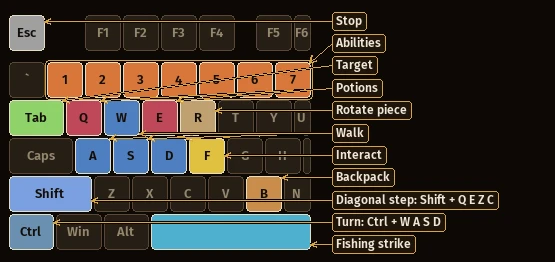
The keyboard answers in two ways. In combat mode the letters move and fight - this page and the next. Press Enter to switch to chat mode, where the letters type; Esc brings you back.
Combat mode, left hand:
W, A, S, D - walk
Shift + Q, E, Z, C - hold Shift for a diagonal step - it takes longer than two straight steps, so use it to round a corner
Ctrl + W, A, S, D - hold Ctrl to turn without moving - aim, let go, then strike
1-7 - the abilities of the weapon in your hand, in the order of the bar
Q, E - drink the potion in your first / second potion slot
Tab - next target (Shift + Tab: previous)
F - interact with what is in front of you: loot, talk, use
B - open or close your backpack
Esc - stop attacking and following
R - rotate the piece you are placing on your land (only while placing)
Space - strike on the mark while fishing
Every key marked here can be changed in Options > Controls, as long as it does not take a key that is already in use.
Combat mode: the rest of the keyboard
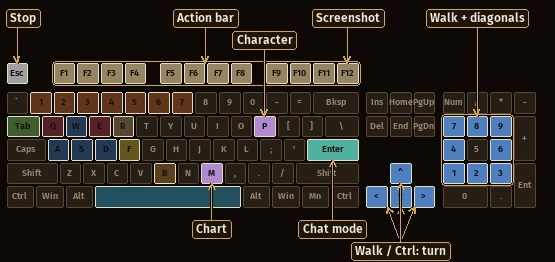
F1-F12; Shift + F1-F4 - slots of the action bar
P - character window
M - sea chart
Enter - switch to chat mode (to type)
Up, Left, Down, Right - walk (Ctrl + arrow: turn)
numpad - walk, with the diagonals on the corners
Chat mode
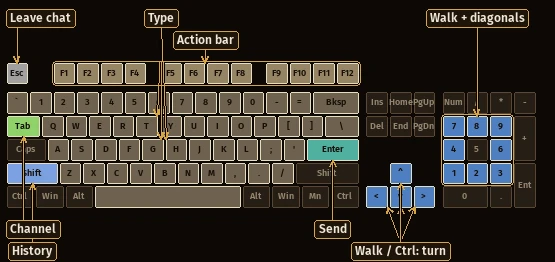
While chat mode is on, letters and numbers belong to the message. Movement stays on the arrows and the numpad.
A-Z, 0-9 - type your message
Enter - send the message
Esc - leave chat mode (back to the keys above) - it also stops attacking and following
Tab - next chat channel (Shift + Tab: previous)
Shift + Up, Down - bring back messages you already sent
Ctrl + A - erase the line you are typing
Ctrl + W - clear every text on the screen
Up, Left, Down, Right - walk (Ctrl + arrow: turn)
numpad - walk, with the diagonals on the corners
F1-F12; Shift + F1-F4 - slots of the action bar
Shortcuts
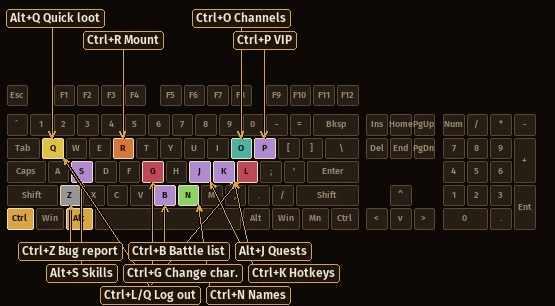
These work in both modes.
Ctrl + R - mount / dismount
Alt + Q - loot the bodies around you
Ctrl + N - show / hide names and bars over creatures
Ctrl + Q, L - log out
Ctrl + G - change character
Ctrl + B - battle list
Ctrl + P - VIP list
Ctrl + K - hotkeys window
Ctrl + Y - visual filters window
Alt + J - quest log
Alt + L - ability list
Alt + S - skills window
Ctrl + O - list of chat channels
Ctrl + H - open the help channel
Ctrl + E - close the current chat channel
Ctrl + F12 - screenshot
Ctrl + Shift + F - full screen
Ctrl + Shift + T - show / hide the top menu
Ctrl + Z - report a bug
Inside windows:
Up / Down move through the lists of the market, the ability list, the hotkeys and the character list
with the spyglass open: the arrows push the view, Enter fires, Esc closes